Previously I have posted about creating REST Web Service from ADF Application Module and in this post, I am going to use the same REST service for populating data in a JET table. Here we’ll populate JET table on top of Oracle ADF BC (Business Components).
Here I am taking the same sample application that I have discussed in my first post Getting started with Oracle JET and JDeveloper
The URL of ADF BC based web service is http://127.0.0.1:7101/RestWebServApp-RESTWebService-context-root/rest/Jdev12.2.1/Department and it returns a list of Departments in nested JSON format
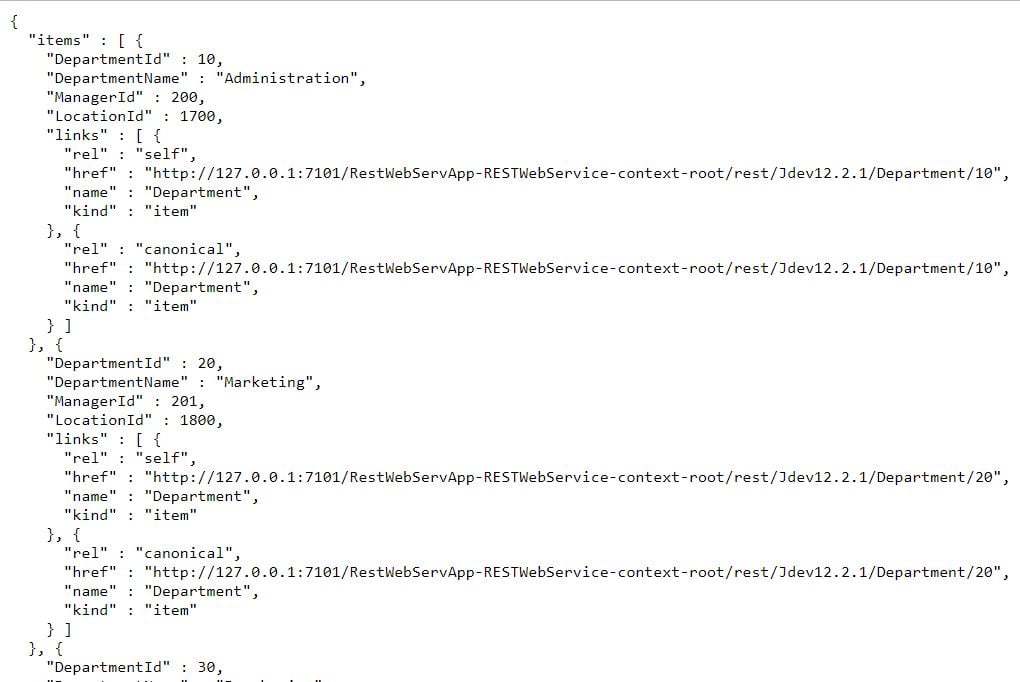
Let’s see the implementation part
Add an oj-table component in the dashboard.html page and define the required number of columns, this web service returns a list of Departments so I have taken 4 columns for Department Id, Department Name, Manager Id, and Location Id
<div class="oj-hybrid-padding">
  <h1>Dashboard Content Area</h1>
<div id="div1">

          <oj-table id='table' aria-label='Departments Table'
                                        data='[[datasource]]'
                                        selection-mode='{"row": "multiple", "column": "multiple"}'
                                        dnd='{"reorder": {"columns": "enabled"}}'
                                        scroll-policy='loadMoreOnScroll'
                                        scroll-policy-options='{"fetchSize": 10}'
                                        columns='[{"headerText": "Department Id",
                                                   "field": "dept_id",
                                                   "resizable": "enabled"},

                                                  {"headerText": "Department Name",
                                                   "field": "dept_name",
                                                   "resizable": "enabled"},

                                                   {"headerText": "Manager Id",
                                                   "field": "mgr_id",
                                                   "resizable": "enabled"},

                                                  {"headerText": "Location Id",
                                                   "field": "loc_id",
                                                   "resizable": "enabled"}
                                                   ]'
                                        style='width: 100%; height: 400px;'>
        </oj-table>

</div>
</div>
Now see the code of dashboard.js, Read comments to understand the javascript code, Here getJSON() method of jQuery is used to call REST Web Service as jQuery is a part of Oracle JET libraries.
/*
 * Your dashboard ViewModel code goes here
 */
define(['ojs/ojcore', 'knockout', 'jquery', 'ojs/ojinputtext', 'ojs/ojtable', 'ojs/ojarraytabledatasource'],
function (oj, ko, $) {
    function DashboardViewModel() {
        var self = this;
        //Define a Knockout observable array and name it tabData
        self.tabData = ko.observableArray();

        //Use jQuery method to call REST Web Service
        $.getJSON("http://127.0.0.1:7101/RestWebServApp-RESTWebService-context-root/rest/Jdev12.2.1/Department").
        then(function (departments) {
        //JSON response is nested that's why 'items' is used to access records
            $.each(departments.items, function () {
                //Push data in Observable array
                self.tabData.push( {
                    dept_id : this.DepartmentId,
                    dept_name : this.DepartmentName,
                    mgr_id : this.ManagerId,
                    loc_id : this.LocationId
                });
            });
        });

        //Pass observable array in utility class to show data in table
        self.datasource = new oj.ArrayTableDataSource(self.tabData,
        {
            idAttribute : 'dept_id'
        });
        .
        .
        .
tabData is a knockout observable array that is defined to hold returned value and you can see that
self.tabData.push is used to push web service data into this array and at last a JET utility class
ArrayTableDataSource is used to convert this observable array in tabular format data.
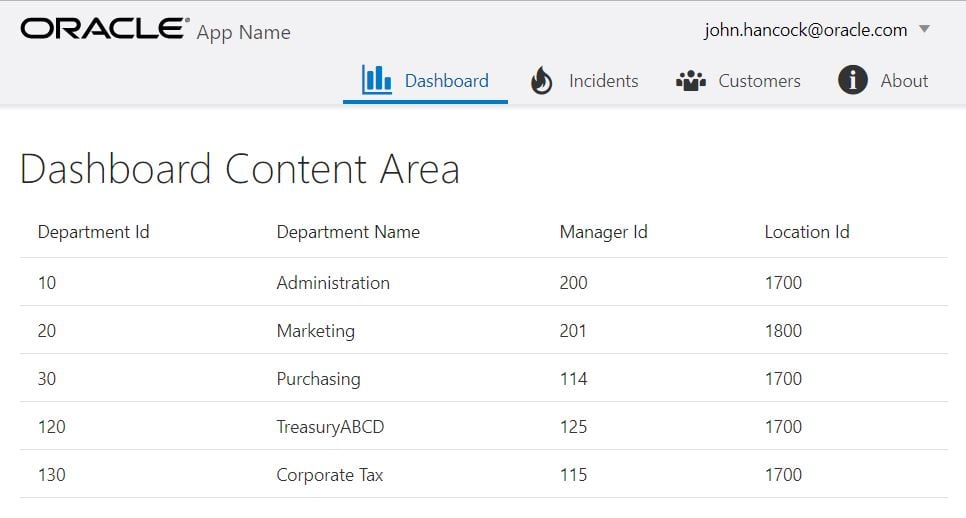
Now run application and you can see that a JET table is populated with Departments data
Cheers
Happy Learning
Published on Web Code Geeks with permission by Ashish Awasthi, partner at our WCG program. See the original article here: Populate Oracle JET table on top of Oracle ADF BC using REST Web Service Opinions expressed by Web Code Geeks contributors are their own. |